Using the Data Access Options
There are several tools available for you to transfer data. They are located in Application ->Data Access. Here we only cover rclone and S3, for other options please refer to their respective documentations.
RCLONE
- Headless: preinstalled in BAND. Use it in terminal by running
rclone. Refer to rclone documentation here - GUI:
- Refer to this video
S3
- Start
Mount S3 bucketfromApplication -> Data Access -
Depends on where your bucket is, select the respective
S3 types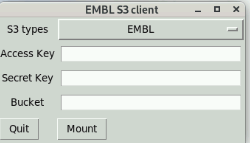
-
Input the required Access key, secret key, and bucket name, then click
Mount. - If it’s successfully mounted, you can find the mounted point under your home folder. The folder name is the same as the bucket name.
- You could start putting your Zarr files to the mounted point.