Exercise 4: Parallelise OME-Zarr Conversion with Nextflow
In this exercise, we will introduce Nextflow to parallelise the OME-Zarr conversion on cluster. We will be using Nextflow version 25.04.
Nextflow files location
- Nextflow configuration for the BAND:
/scratch/ibSB_workshop_2026/nextflow/nextflow_band.config - Nextflow script to convert images:
/scratch/ibSB_workshop_2026/nextflow/main_eubi_bridge.nf
Inspect the example conversion script
An example nextflow script is provided at /scratch/ibSB_workshop_2026/nextflow/main_eubi_bridge.nf. Use a text editor available on your BAND desktop to view the script. Refer to Nextflow documentation if you have questions.
Run the Nextflow script
-
Open a terminal from
Application->System Tools->Terminal. This will be used to run Nextflow commands. -
Open a second terminal to monitor the cluster queue.
-
In the second terminal, run the below command to watch jobs submitted by Nextflow. The terminal output refreshes every half seconds.
watch -n .5 squeue -u $USER
- In the first terminal, run
nextflow -C /scratch/ibSB_workshop_2026/nextflow/nextflow_band.config run \
    /scratch/ibSB_workshop_2026/nextflow/main_eubi_bridge.nf \
    -profile conda \
    --input_dir /scratch/ngff_workshop/examples/pff \
    --output_dir ~/nf-conversion-results
What happens?
-Cspecifies the configuration file for running Nextflow on BAND-profile condatells Nextflow to use the preinstalled eubizarr conda environment for dependencies-
--output_dirsets the directory for conversion results. Nextflow willcreate it automatically. -
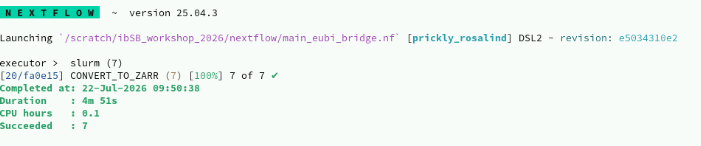
Wait for the run to finish. Once ot finishes, you should see the following completion summary in terminal.
Tips:
- Nextflow will make use the available resources in the BAND cluster.
- By default, the Nextflow script converts images into OME-Zarr version 0.4. Try search the Eubi-Bridge documentation to try to make it output OME-Zarr version 0.5
- Always check the content of
~/nf-resultsto confirm the conversion finished. - If you need to re-run the conversion command, remove the contents of
~/nf-conversion-results:
rm -rf ~/nf-conversion-results/*