Exercise 3: Parallel Image Conversion with Eubi-Bridge
In this exercise, you will run the image conversion on the cluster using SLURM.
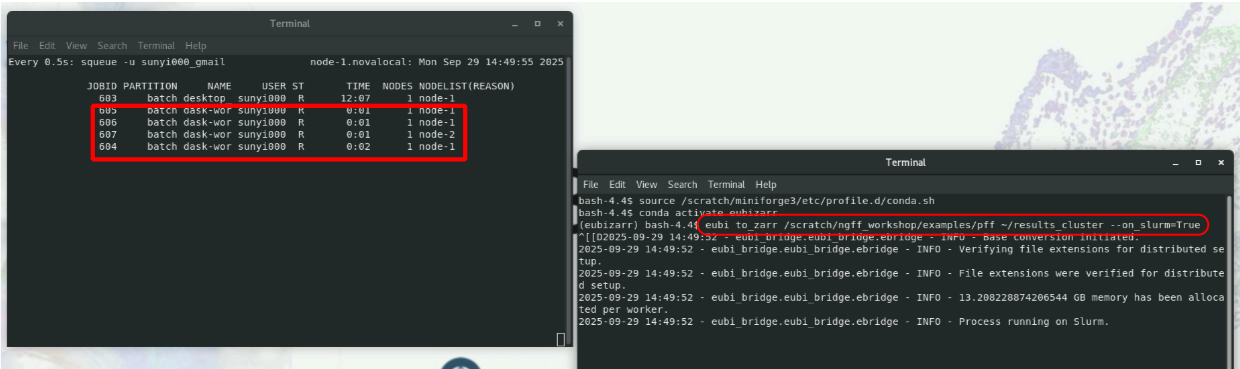
Monitor the queue in a second termin
Open a second terminal and run:
watch -n 0.5 squeue -u YOUR_USERNAME
This updates squeue every 0.5s to monitor the queue.
Run the conversion
In your first terminal (with the conda environment activated), run:
mkdir ~/results_cluster             # make result folder
eubi to_zarr /scratch/common/data/small_dataset  ~/results_cluster --on_slurm=True # run the conversion on slurm
What happens?
- EuBI-Bridge uses Dask internally to submit jobs to SLURM.
--on_slurm=Trueenables EuBI-Bridge to submit jobs to SLURM.- The jobs are sent to the default partition(
batch). - You should see 4 new jobs appear in the
squeueoutput. - The name of the jobs is
dask-worker.
Tips:
- By default, EuBI-Bridge starts 4 jobs.
- To request more jobs, check the EuBI-Bridge documentation for more configuration options.
- Always check the content of
~/results_clusterto confirm the conversion finished. - If you need to re-run the conversion command, remove the
~/results_cluster:
rm -rf ~/results_cluster