Exercise 4: Image Conversion with sbatch
Not all software supports internal parallelization. In those cases, you can use Slurm directly with an sbatch script.
--
Inspect the example script
An example script is available at:
/scratch/ngff_workshop/submit_job.sbatch
Read the comments in the file.
Submit the job
Remember in Exercise 3, EuBI-Bridge by default start 4 jobs. Instead of changing the configs in EuBi-Bridge to have more jobs submitted, we can use sbatch to do the same with the SLURM's --array parameter.
Make a copy of the submit_job.sbatch script to your own home folder
cp /scratch/ngff_workshop/submit_job.sbatch /home/YOUR_USERNAME
Submit it to SLURM
sbatch /home/YOUR_USERNAME/submit_job.sbatch (use your own path)
Expected output(example):
Submitted batch job 529
The number 529 is the job id.
Check the queue
Open your monitoring terminal, you should see:
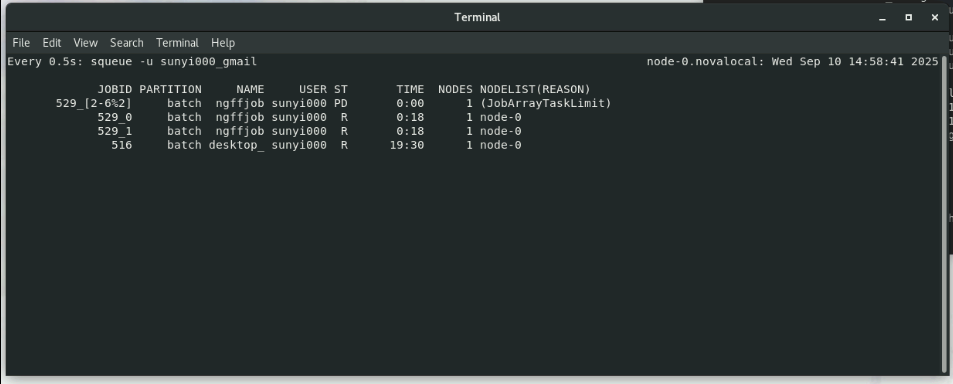
The above screenshot tells you - sbatch submitted 7 jobs for the conversion. - 2 out of the 7 jobs run at a time - You can change this behaviour using SBATCH parameters in the .sbatch script.
Check log files
Output and error logs are stored in:
    ~/ngfflogs/ngffjob_<job_id>.out  # This is the stdout log
    ~/ngfflogs/ngffjob_<job_id>.err  # This is the error log
Verify the results
Check the converted Zarr files:
- The are stored in folder
results_[0-6](results_1, results_2 ... results_6)